Skip to content
Smart breaks No heading ends a page

The HTML to PDF API. No broken pages.

Send HTML or a URL, get a PDF that reads well. pdfember keeps headings with their text, does not cut entries in half, repeats sidebars on every page, or prints one long page that looks exactly like your web preview.

Free: 1,000 PDFs a month, no card.

Got a PDF right now? Fix it here, free.

What to do All 19 tools

    Free, no sign-up. Files are processed in memory and not kept.

    POST /api/v1/pdf· 200 OK· application/pdf · 2 pages · 840 ms
    # A resume as two clean A4 pages
    curl https://pdfember.com/api/v1/pdf \
      -H "Authorization: Bearer $PDFEMBER_KEY" \
      -H "Content-Type: application/json" \
      -d '{
        "html": "<html>…your resume…</html>",
        "layout": "pages",
        "page": { "size": "A4", "margin": { "top": 12, "bottom": 12 } }
      }' \
      -o resume.pdf
    // Laravel
    $pdf = Http::withToken($key)
        ->post('https://pdfember.com/api/v1/pdf', [
            'html'   => view('cv', $data)->render(),
            'layout' => 'single-page',
        ])
        ->throw()
        ->body();
    
    // X-Pdfember-Pages: 1
    // X-Pdfember-Documents-Left: 999

    The run

    One request. Every step accounted for.

    1. 0 ms

      Received

      38 KB of HTML, options checked before rendering starts.

    2. 212 ms

      Loaded

      Fonts and images waited for. Private addresses refused.

    3. 260 ms

      Measured

      41 blocks kept together, 9 titles kept with their text.

    4. 790 ms

      Printed

      2 A4 pages. Sidebar repainted on page 2.

    5. 840 ms

      Returned

      The PDF in the response body. 1 document from your plan.

    Smart page breaks

    Printing HTML cuts pages anywhere. pdfember picks the break.

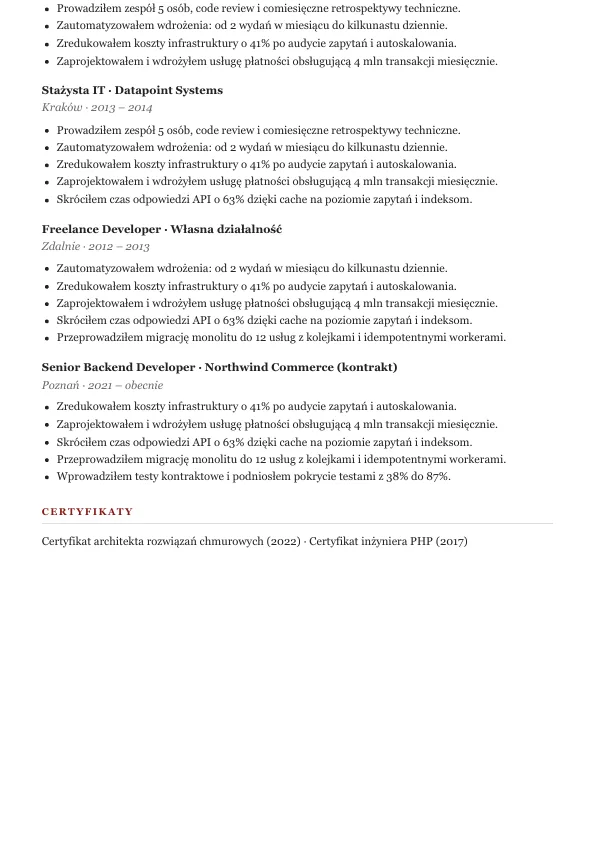
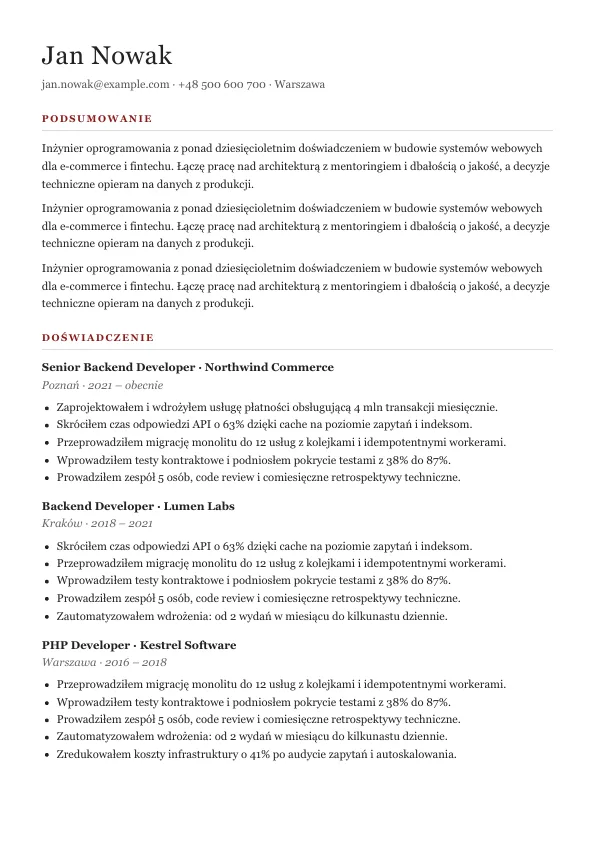
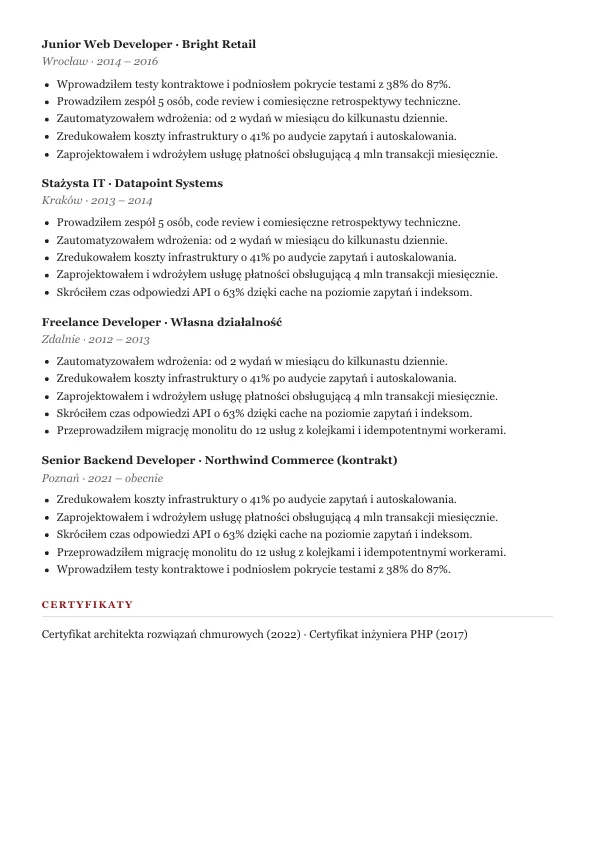
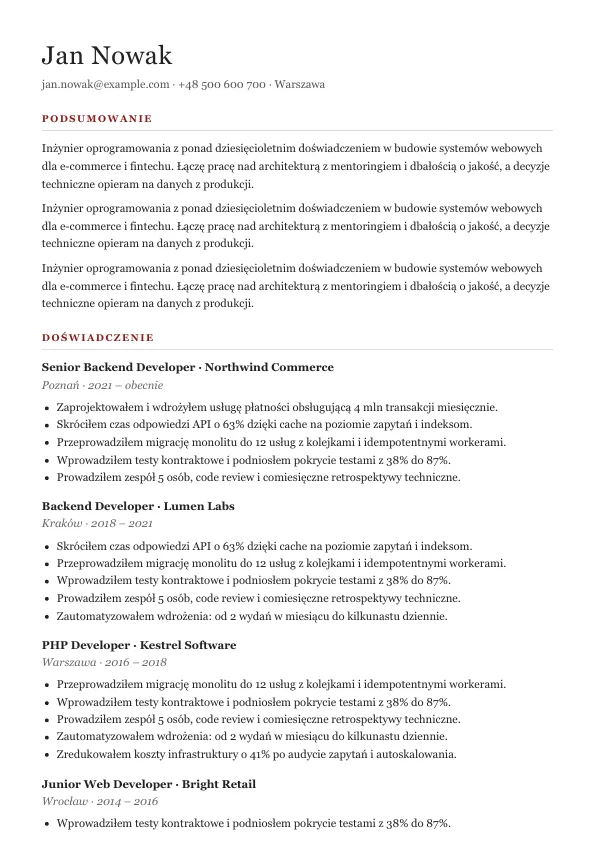
    The same resume, printed twice. Left: a plain print, which ends page 1 on an entry title and a single bullet, then starts page 2 on the paper's edge. Right: pdfember moves the entry whole and gives page 2 its padding back.

    Plain browser print Title and one bullet stranded
    Plain browser print, page 1 Plain browser print, page 2
    pdfember, layout "pages" Entries whole, padding on every page
    pdfember, layout "pages", page 1 pdfember, layout "pages", page 2
    How smart breaks decide

    What it does

    Every PDF job, one API. Each with a request that runs.

    Paged PDFs

    A4, Letter, Legal, A3 or A5 with margins, a separate first-page margin and your print CSS.

    Smart page breaksRepeating table headersFull-height sidebars

    Resumes, invoices, reports and contracts.

    One-page digital PDFs

    One page as tall as the document, at the width you choose. Reads exactly like the web preview.

    No page breaks at allScreen or print CSSForced breaks ignored

    Resumes sent by email, portfolios, receipts.

    HTML or URL

    Post raw HTML up to 5 MB or a public URL. Fonts and images are waited for before printing.

    Inline or remote assetsWait for a selectorJavaScript on or off

    Server-rendered views and SPAs.

    Your own CSS

    Add CSS on top of the page, or steer breaks with data attributes when a heuristic is not enough.

    data-pdfember-keepdata-pdfember-break-beforedata-pdfember-allow-break

    Templates you cannot edit.

    Built for Laravel

    One HTTP call from any stack, with Laravel examples in the docs. Nothing to install on your app server.

    API keys per appUsage per month

    Laravel, Symfony, Node and Python apps.

    19 PDF tools

    Merge, split, rotate, crop, watermark and number the PDFs you already have, in the browser or with one API call.

    Merge and splitWatermarksPage numbers

    Contracts, scans, reports and invoices.
    Who it is for

    Built for apps that ship documents.

    Resume and document builders

    The paged and the one-page version of the same template, both readable.

    SaaS products

    Invoices, statements and reports from the views you already render.

    Laravel apps

    Nothing to install on the app server: your app stays small and stateless.

    AI agents

    Turn generated HTML into a PDF with one tool call.

    How it works

    HTML in. A PDF out.

    1. 01

      Send

      POST /api/v1/pdf with html or url and a layout.

    2. 02

      Render

      pdfember lays the page out and marks the safe breaks.

    3. 03

      Receive

      The PDF comes back in the response, with page count headers.

    // Request options
    {
      "html": "<html>…</html>",
      "layout": "pages",          // or "single-page"
      "page": { "size": "A4", "margin": 10 },
      "media": "print",
      "smartBreaks": true,
      "waitForSelector": "#ready"
    }
    // 422 Unprocessable Content
    {
      "error": {
        "code": "invalid_request",
        "message": "Unknown option \"pagesize\"."
      }
    }

    Pricing

    Pay per document. Not per page.

    1 credit a document. Failed renders are free.

    A document is one PDF you get back, however many pages it has: a one-page receipt and a 40-page report cost the same. A merge, split or watermark run is one document too. Example: a resume as a paged PDF plus its digital version is 2 credits.

    Free

    $0 / month

    1,000 PDFs

    2 renders at once

    20 requests/min

    Start free

    Starter

    $9 / month

    10,000 PDFs

    5 renders at once

    120 requests/min

    Choose Starter

    Pro

    $29 / month

    50,000 PDFs

    10 renders at once

    300 requests/min

    Choose Pro

    Business

    $79 / month

    200,000 PDFs

    25 renders at once

    600 requests/min

    Scale

    $199 / month

    1,000,000 PDFs

    50 renders at once

    1,500 requests/min

    Choose Scale

    Every plan includes every feature: smart page breaks, one-page PDFs, all 19 PDF tools and the playground. No hourly caps.

    Questions, answered.

    What does "smart breaks" change?

    Before printing, pdfember measures the laid-out page and marks blocks that should not be split: short blocks stay whole, titles stay with the text after them, long lists keep at least two items on each side of a break, and tall padded columns keep their padding on every page. Your HTML is not rewritten; only break properties are added.

    Are renders isolated from each other?

    Yes. Every render runs in a fresh, isolated context: no cookies, storage or cache are shared between documents.

    Can it reach my internal network?

    No. Pages may load public http(s) resources only; private, loopback and link-local addresses are refused.

    Do you keep my documents?

    No. HTML and PDFs live only for the request. pdfember records the page count, size and duration for your usage.

    Is there a free plan?

    Yes: 1,000 PDFs a month, two renders at a time, no card. Every feature is included.

    Do long documents cost more?

    No. A document is one PDF you get back, however many pages it has, and a merge, split or watermark run is one document too. Failed renders are free.

    Render your first PDF. Free, no card.